
Google Workspace
Migrate Gmail, Drive, calendars, and contacts.


VaultMe helps you prepare before launch, catch issues early, and understand what is happening from setup to completion.
Migrate email, files, calendars, and contacts without juggling separate tools.

VaultMe focuses on the most common business migration path: moving between Google Workspace and Microsoft 365 environments.
Google and Microsoft migrations have their own behaviors, permissions, limits, file formats, and edge cases. VaultMe is designed around those realities rather than treating them as just another provider checkbox.
Migrate Gmail, Drive, calendars, and contacts.

Migrate Outlook, OneDrive, calendars, and contacts.

Migrate mailboxes to and from Exchange.

Migrate mailboxes to and from any IMAP-compatible mail system.

Migrate to and from personal account.
A business migration usually involves more than email alone. VaultMe lets you migrate email, files, calendars, and contacts together in a single workflow — or separately when needed.
No more switching between disconnected tools or tracking multiple jobs. Everything happens in one place.
Migrate emails with folders and attachments.
Migrate files and documents with folder structure.
Migrate calendars, events, and recurrence settings.
Migrate contacts with folder organization.

Bring core content types together in a single workflow.


Migrate everything at once or choose only what you need.


Track status, progress, and the audit trail in one place.

VaultMe builds readiness checks into the migration workflow, helping surface potential blockers before migration starts.
Resolve what needs attention upfront, then run the migration with fewer surprises.
VaultMe checks key requirements before migration starts.
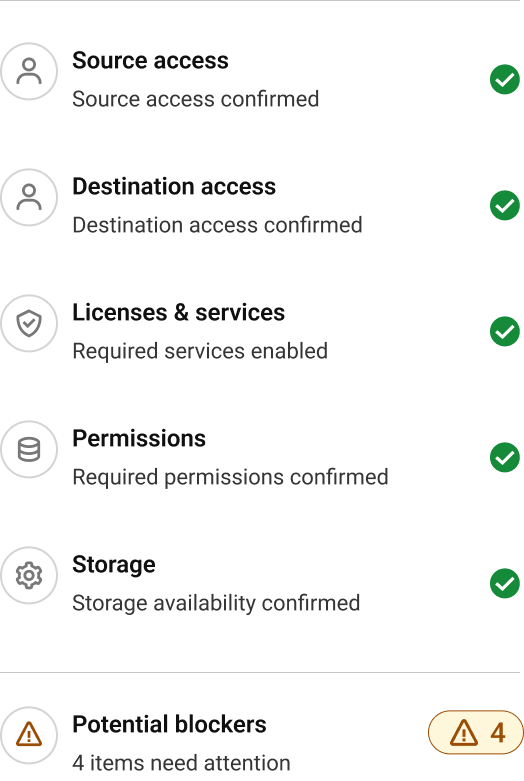
See what is ready and what needs attention.
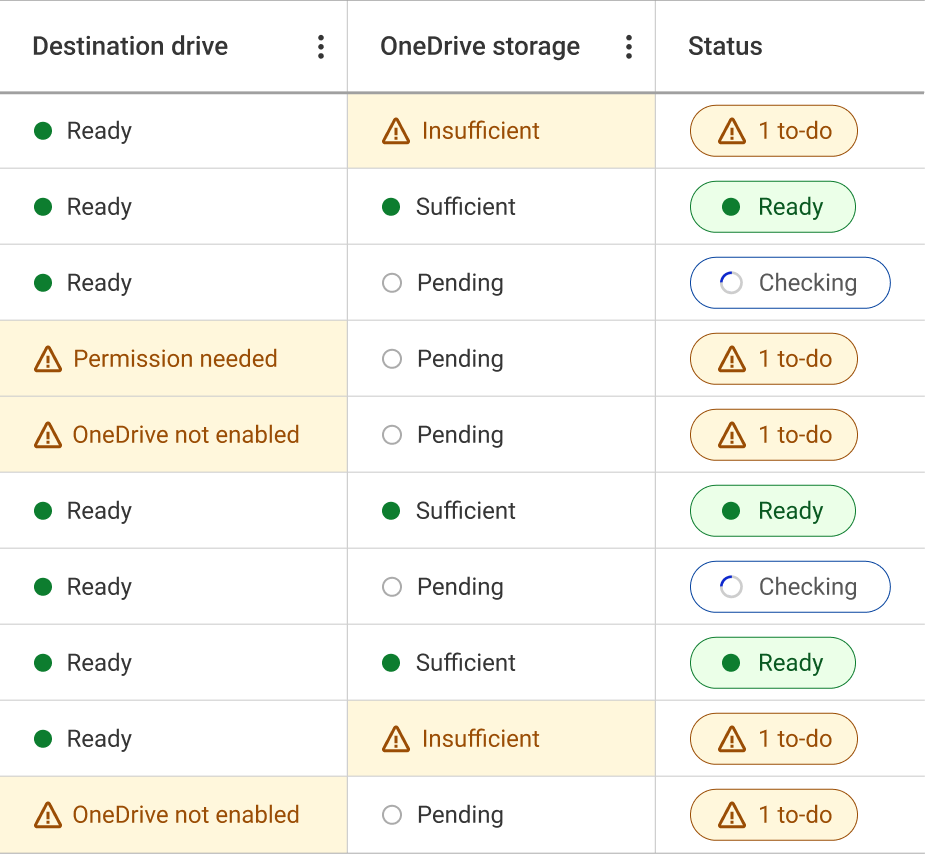
Get practical steps for anything that needs attention.
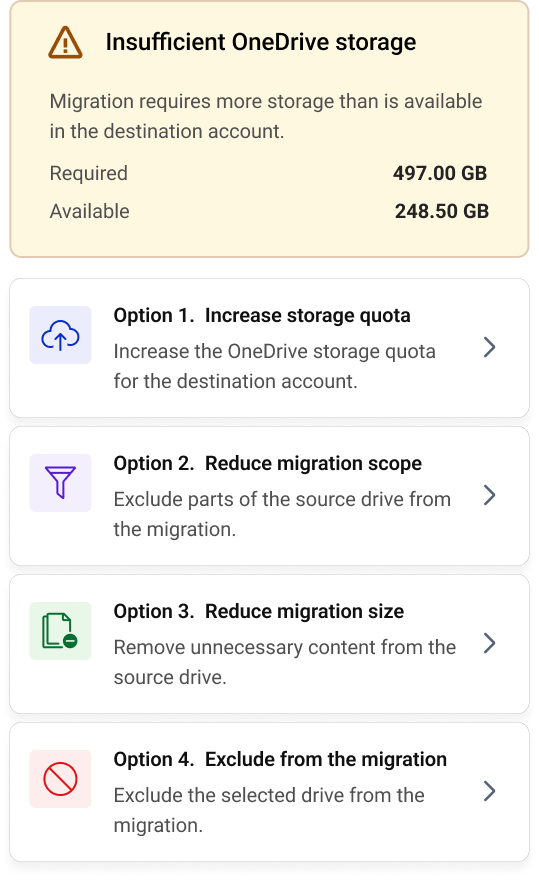
See what to do, step by step, for your migration scenario.
Get instant answers for your migration scenario.
Discuss your project with a Google and Microsoft migration expert.
VaultMe is used across organizations with different content volumes, migration requirements, provider configurations, and rollout approaches.

Industries

Countries Worldwide

Compliant

“We've relied on VaultMe for nine years now, and it has consistently impressed us with its performance, attention to detail, and responsive support. Whether handling one-off migrations or larger batch jobs, the results have always been reliable.”
“VaultMe works seamlessly. It walks you through the migration process, step by step. ... The process was smooth, quick, and a good value.”
“Compared to previous tools we've tested, it was a breath of fresh air. Overall, it worked really well.”
“Idiot-proof migrations. The ease of use and provided instructions for each combination of account types makes it easy to manage at scale for non-technical users.”
“Your customer service has been outstanding, and I'm grateful for all the help you've provided. I hope we have the opportunity to work together again in the future!”
“I definitely like VaultMe, it's a time-saving tool for email migration.”
“VaultMe is your best bet for this exact scenario. It handles email, contacts, calendars, and Drive in one go for consumer Gmail. Worth the cost for 40 users versus a manual weekend.”
“What I particularly value about your solution is its ability to successfully migrate Calendars and Contacts from Gmail accounts, an area where many tools struggle due to IMAP protocol limitations.”
Pick the path that matches your migration and see how VaultMe handles it.

Migrate email, files, calendars, and contacts from Google Workspace to Microsoft 365.
View scenario
Migrate email, files, calendars, and contacts from Microsoft 365 to Google Workspace.
View scenario
Migrate email, files, calendars, and contacts between Microsoft 365 tenants.
View scenario
Migrate email, files, calendars, and contacts from personal Gmail accounts to Google Workspace.
View scenarioPrepare thoroughly. Catch issues early. Run the migration with fewer surprises.


